SIW Freeware Edition bundled with OpenCandy
Your one-stop solution for all your computer information needs.
SIW Freeware Edition (discontinued in 2001) was bundled with OpenCandy
Don't like bundles? SIW Home is unbundled.
People want everything for free.
Complex software that takes months, maybe years to develop must be free, it is people's constitutional right to get it for nothing and be angry if it - God forbid - installs a shiny ad toolbar along the way.
At the same time people will gladly leave $10 at Starbucks for a cup of warm water in it and even say thank you when they leave.
If only people would pay for the software they use - even a fraction of its value - no one would ever need things like OpenCandy / InstallMonetizer / Conduit / Other Toolbars.
What is OpenCandy?Top ↑
OpenCandy is an advertising application
OpenCandy is similar to Google AdSense, except it displays advertisements in installation program instead of websites. These advertisements promote another software packages. The advertisements are selected by providers of software being installed. When user installing a software (SIW) chooses to install promoted package, revenue is generated and shared between OpenCandy and software providers (SIW developers).See more details about OpenCandy on CNET
Is it Adware?Top ↑
Some may consider OpenCandy is an adware. It is a way to recover software development costs using advertisement.
On the other hand, OpenCandy does not demonstrate the negative characteristics commonly associated with adware:
On the other hand, OpenCandy does not demonstrate the negative characteristics commonly associated with adware:
- Advertisement is only shown as one step of software installation. Once software (SIW) is installed, you do not receive any more advertisements.
- No unwanted software is installed. User has to explicitly choose to install promoted software to actually receive it.
- No private information are collected. Installation program collects only information necessary to choose relevant advertisement, such as geo-location, operating system and language.
What is the benefit of using OpenCandy?Top ↑
Some softwares can be promoted by using OpenCandy. The promotion is not mandatory. It's all from the information which software you had installed.
How does OpenCandy recommendation look like?Top ↑
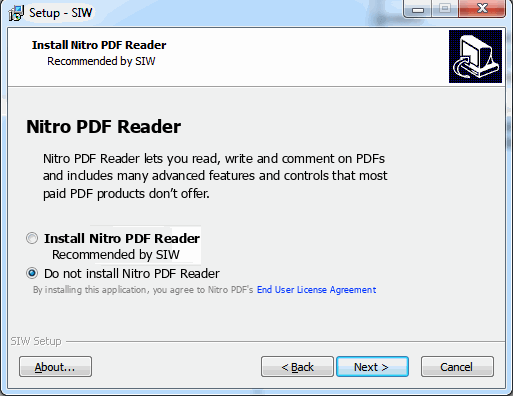
Below it an example of OpenCandy recommendation screen in SIW installation program.
Use the Install ... button (or similar) to choose to install the recommended application.
Use the Do not install ... button (or similar) to continue installing SIW without installing the recommended application.
Use the Install ... button (or similar) to choose to install the recommended application.
Use the Do not install ... button (or similar) to continue installing SIW without installing the recommended application.