Welcome to SIW: The Ultimate System Information Tool for Windows
Your one-stop solution for all your computer information needs.Latest SIW version: 16.16.1014i Released: November 15, 2026 • What's new
Comprehensive System Information Tool
SIW (System Information for Windows) brings hardware, installed software, Windows configuration, and network details into one inventory and diagnostic tool.
Who SIW is for
- Home users: identify components, troubleshoot a PC, and plan upgrades.
- Support technicians and help desks: collect system details for troubleshooting and customer support.
- IT teams: inventory hardware, software, and network configuration across Windows systems.
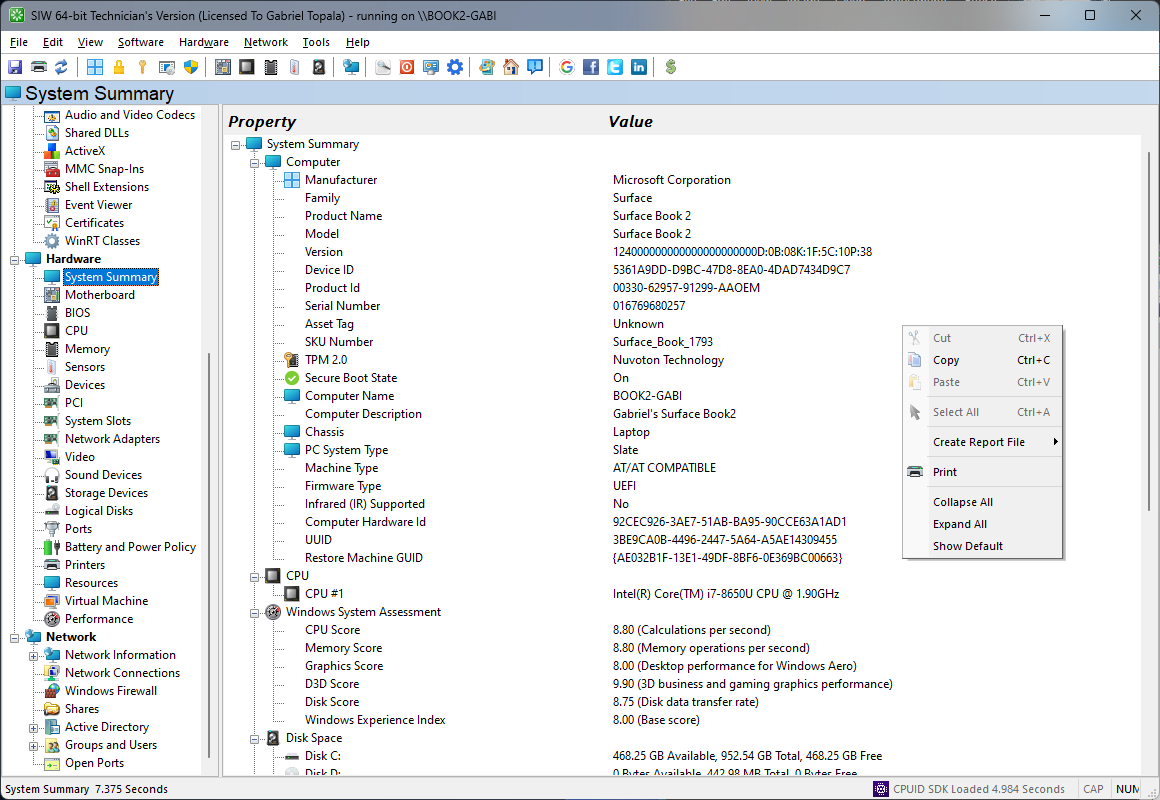
SIW provides a wide range of information about your computer, including:
- Operating System
- Software Updates
- Windows Features
- Licenses
- Passwords
- System Directories
- System Files
- Installed Programs
- Applications
- Security
- Accessibility
- Environment
- Regional Settings
- File Associations
- Running Processes
- Loaded DLLs
- Drivers
- NT Services
- Autorun
- Browser Helper Objects
- Scheduled Tasks
- Databases
- Audio and Video Codecs
- Shared DLLs
- ActiveX
- MMC Snap-Ins
- Shell Extensions
- Event Viewer
- Certificates
- WinRT Classes
SIW Resources
Connect a practical question with the relevant SIW documentation:
- SIW Frequently Asked Questions for product, licensing, update, and troubleshooting answers.
- SIW release notes and version history for compatibility and feature changes.
- Download the free SIW trial to evaluate the hardware, software, and network modules.
Get a direct technical answer for common Windows hardware questions, then see the corresponding SIW module for deeper inventory and diagnostics.
- Why is my computer beeping?
- What to do if SIW does not start, freezes Windows, or causes a blue screen
- How to check CPU temperature in Windows 11
- How to find your motherboard model in Windows
- How to check SSD health and SMART information
- How to generate a Windows hardware inventory report
- How to list installed programs
- How to check open network ports
- How to find Windows software license information
- Windows default product keys: what they do and do not do
- How to collect system information without installing software
- What tool can generate a Windows hardware inventory?
- Which SIW Edition is Right for You?
Easy to Use
Another key feature of SIW is its easy-to-use interface. The tool is designed to be user-friendly, with a straightforward interface that makes it easy to access the information you need. Whether you are an expert or a beginner, you will be able to quickly find the information you need and understand it easily.SIW is designed to be user-friendly, with a straightforward interface that makes it easy to access the information you need.
The intuitive interface allows you to quickly navigate through the different categories of information and find what you need.
Reports
Another useful feature of SIW is its ability to generate reports.
With just a few clicks, you can generate detailed reports (HTML, JSON, CSV, TXT, or XML) about your computer's hardware and software, which you can then save or print for reference.
This makes it easy to keep track of important information about your computer and to share it with others.
SIW To ODBC imports SIW XML reports into an ODBC-compatible database for centralized inventory, querying, automation, and long-term reporting.
Choose your SIW edition
Compare the audience, deployment, and current first-year price. Each edition includes one year of updates.
| Compare | Home Edition | Technician's Version | Enterprise Edition |
|---|---|---|---|
| Best for | Personal, non-commercial use | IT technicians, consultants, and help desks | Businesses, government agencies, schools, and other organizations |
| Deployment | Installed and activated on your computer | Portable; run from a USB flash drive or network share | Portable or installed; includes Technician's Version |
| License scope | Up to three activated computers for personal use | Per person, for professional support work | Organization-wide use on computers owned, leased, or managed by the licensed organization |
| First-year price (USD) | 19.99 | 49.99 | 999.99 |
| Purchase | Buy Home | Buy Technician | Buy Enterprise |
The software license is perpetual. Updates renew annually unless canceled; an expired update subscription does not stop your installed version from operating. Review purchase and renewal notes and the License Agreement before ordering.
Portable use and deployment
SIW Technician's Version is portable: the application does not require installation and can be launched from a USB flash drive or network share. However, it requires administrator privileges for normal use and loads a kernel-mode driver; portability does not mean it runs unprivileged.
SIW sends no telemetry. Available product documentation does not specify whether execution creates local cache or temporary files or execution logs, or whether it makes other automatic outbound requests. Verify these behaviors and test the tool against your organization's policies before using it in a managed or regulated environment.
Requirements and Safe Execution
Client Platform: Windows 11 / Windows 10 / Windows 8.1 / Windows 8 / Windows 7 / WinPE / WinRE
Server Platform: Windows 2025 / Windows 2022 / Windows 2019 / Windows 2016 / Windows 2012 R2 / Windows 2012 / Windows 2011 / Windows Server 2008 R2
Customized Builds: Windows NT / Windows XP / Vista / Windows 2000 / Windows 2003 / Windows 2008 / Winternals ERD Commander
Safe execution:
Download SIW from the official SIW download page. Before running an installer or portable executable, right-click it in Windows Explorer, choose Properties > Digital Signatures, and verify the publisher and signature status.
In managed environments, follow your organization's application-control and malware-scanning requirements; do not run a modified or invalidly signed copy.
Updates
SIW is maintained through a published, versioned release history. New releases are published throughout the year and document changes such as support for new Windows versions and hardware, expanded device data, and stability improvements.
Paid editions use a yearly update subscription; see the purchase information for current update coverage and review the release notes before deployment to confirm compatibility.
Security, Privacy, and Responsible Use
SIW can report detected product keys or partial keys for supported software products where that information is available. It reports these values; it does not validate license entitlement or certify software-license compliance. See the Licenses module and license-information guide for scope and limitations.
Use SIW only if authorized to inspect the computer. It can display sensitive information, including software license data, saved credentials, certificates, network configuration, file paths, and running processes; treat reports and exports as confidential and share them only through approved channels.
SIW provides diagnostic and inventory data, but it is not a compliance certification or a replacement for your organization's security controls. Review the Privacy Policy and License Agreement before deployment.
Windows Technologies and SIW Utilities
DLL means dynamic-link library, a shared Windows component used by applications and services. SIW lists loaded and shared DLLs so administrators can investigate software dependencies and installation problems.
ODBC (Open Database Connectivity) is a standard interface for connecting applications to databases.
Browser Helper Objects (BHOs) are COM-based extensions designed for Internet Explorer. They can add browser features and interact with browser content; they are a legacy Internet Explorer technology, not a general name for modern browser extensions. SIW's Browser Helper Objects module lists registered BHOs and related details to help review older browser integrations or investigate unwanted add-ons.
WinRT classes are named types in the Windows Runtime that expose Windows platform functionality to applications through defined interfaces and activation. SIW's WinRT Classes module lists class registrations and related activation details, helping administrators and support professionals review available components and troubleshoot application compatibility.
Eureka! reveals text hidden behind masked password fields in supported applications for legitimate credential recovery and troubleshooting. Use it only on systems and accounts you are authorized to access.
Get Started Today
Use SIW to investigate hardware issues, review system details, and make informed support and upgrade decisions; it reports information rather than automatically optimizing your computer. Get SIW today and take control of your Windows system. Document assets, troubleshoot issues, and review detected license-key information for supported products. Learn what SIW can and cannot retrieve in the license-information guide.
Contact Us
Do you have any questions or need support? Check the support forum or contact us at support@gtopala.com and our team will be happy to assist you.
Conclusion
SIW gives IT operations teams, help desks, and support technicians a practical way to inventory Windows systems, troubleshoot hardware and software issues, document configurations, and plan upgrades.
Choose the edition that matches your use: the portable Technician's Version for authorized customer support, Home Edition for personal use, or Enterprise Edition for internal organizational use.